
Two new Mun Samsung themes take different approaches to the season. Snow Lily Bloom is soft and floral, while New Year Cheers uses clean blue line art and small celebration details. Both are now available in the Samsung Galaxy Store.
Snow Lily Bloom keeps the winter screen quiet
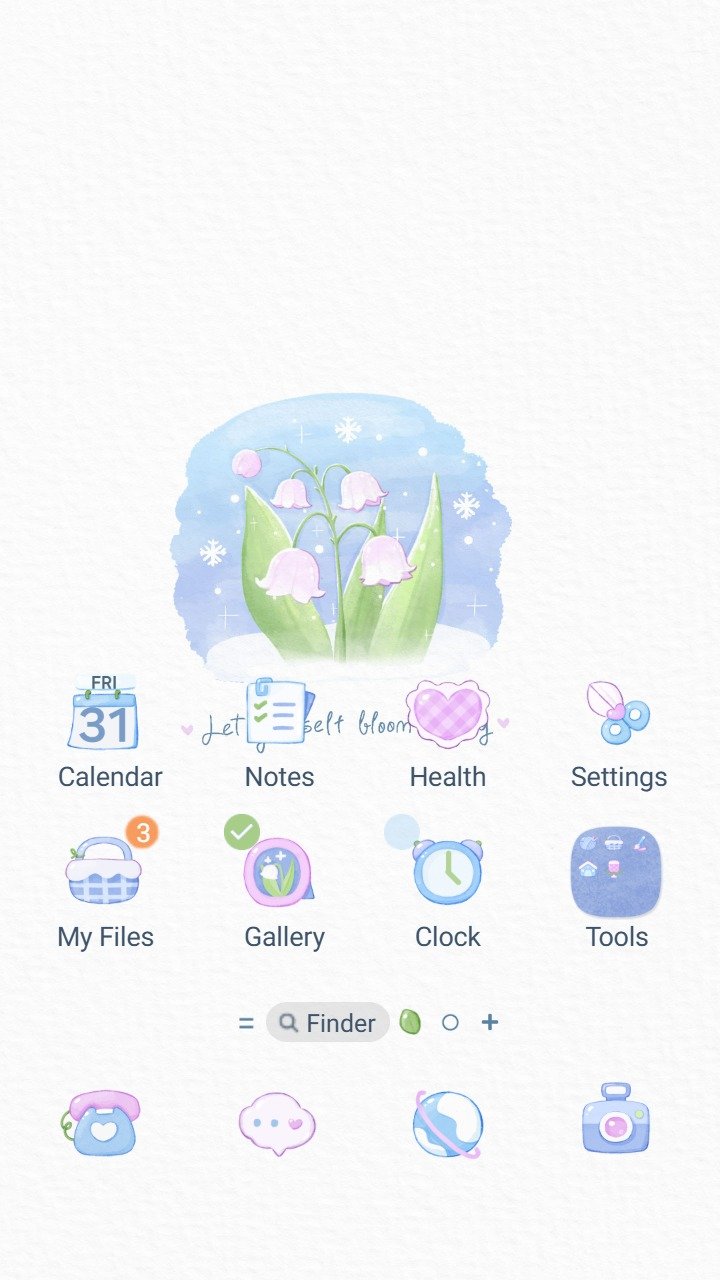
Snow Lily Bloom places a small watercolor group of pink lilies inside a pale blue winter scene. The white background leaves plenty of open space, and the matching Samsung icons use the same pale blue, pink, and green palette.
The preview also carries the floral idea into interface details instead of limiting it to the wallpaper. That makes it a good fit when you want a seasonal Home Screen without a dense pattern behind app labels.
Open Snow Lily Bloom in the Samsung Galaxy Store.
New Year Cheers uses a cleaner celebration style
New Year Cheers uses a light textured background with blue line drawings. The Home Screen preview centers a Happy New Year message with a disco ball, flowers, a cake, and glasses raised for a toast.
The matching dialer keeps the same thin blue lines and adds small celebratory marks around the numbers. Warm orange accents appear on a few controls, but the overall palette stays restrained.
Open New Year Cheers in the Samsung Galaxy Store.
Which theme fits your screen?
- Choose Snow Lily Bloom for watercolor flowers, pastel icons, and a quiet winter mood.
- Choose New Year Cheers for a seasonal message, blue line art, and a more celebratory look.
- Preview the Home Screen, Lock Screen, dialer, and text areas before applying either theme.
If readability is your first priority, use our Samsung theme readability checklist. Theme availability, price, and appearance can vary by Galaxy model, country, and One UI version, so the Galaxy Store listing is the final source for compatibility.
Before you switch
Keep your current theme in My stuff so you can return to it later. If you want a neutral comparison point, you can also restore Samsung’s default theme without deleting themes you downloaded.